🔄 Redirect Rules
In Redirect Rules section you can manage your redirect rules. You can add or delete redirect rules.
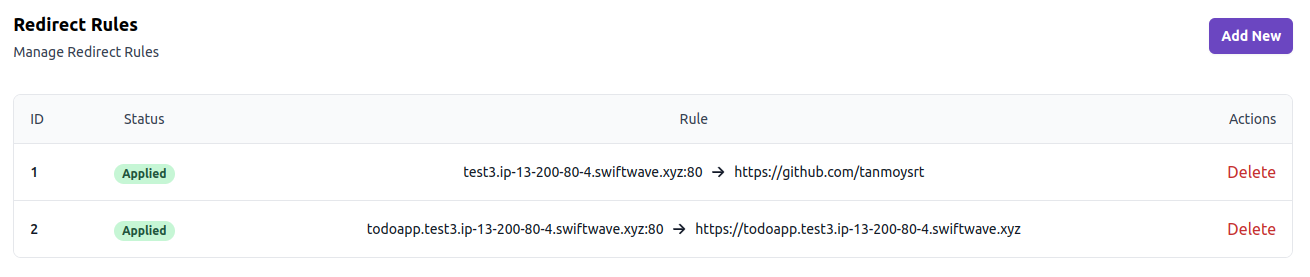
😅 Don't know what redirect rules are ?
In layman's terms, redirect rules are the rules that will redirect your domain to another URL.
- Maybe you have a domain
github.portfolio.comand you want to redirect it to your github profilehttps://github.com/tanmoysrt, you can do that by creating a redirect rule. - Also, if you want to setup a HTTPS redirect, you can do that by creating a redirect rule, which will redirect all the HTTP requests from your domain to HTTPS one.
Add Redirect Rule
It's very easy to add a redirect rule. Just click on Add New button and you will see a form like this:
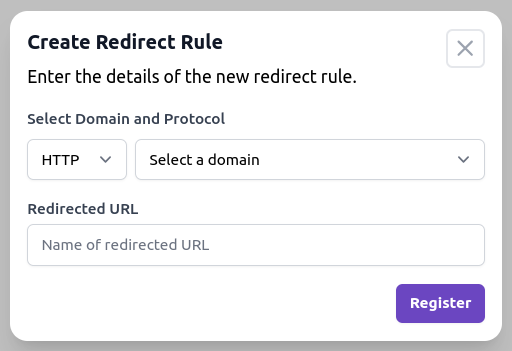
- Choose the protocol (http/https) and domain you want to redirect.
- Choose the url where you want to redirect your domain.
- Click on Register button and you are done.
Delete Redirect Rule
To delete a redirect rule, click on Delete button. You will see a confirmation dialog. Confirm it and your redirect rule will be deleted.
HTTPS Redirect
If you want to redirect all the HTTP requests from your domain to HTTPS one, you can do that by creating a redirect rule.
Suppose, you want to enable HTTPS redirect for myapp.com. You can do that by creating a redirect rule like this:
- Domain:
myapp.com - Redirect URL:
https://myapp.com